


The Videocon D2H Satellite Management Password is required to access advanced set-top box (STB) settings such as satellite tuning, transponder configuration, signal strength monitoring, and installation options. Unlike the default STB password, the Satellite Management Password is generated from your unique Smart Card Number.
How to Find Your Videocon D2H Smart Card Number
Before generating the Satellite Management Password, you need your Smart Card Number. You can locate it using any of the following methods:
- Check the sticker on the side or back of your Videocon D2H Set-Top Box.
- Press the Menu button on your remote.
- Navigate to My Account.
- Your Smart Card Number will be displayed on the screen.
How to Generate the Satellite Management Password
The password is created using the 4th, 6th, 8th, and 10th digits of your Smart Card Number.
Example
| Smart Card Number | Satellite Management Password |
|---|---|
| 1234567890 | 4680 |
In this example:
- 4th digit = 4
- 6th digit = 6
- 8th digit = 8
- 10th digit = 0
Therefore, the Satellite Management Password is 4680.
If you are unable to determine the password, you can contact D2H Customer Care for assistance.
Default STB Password
During the initial installation or while accessing certain setup menus, you may also be asked for the default Set-Top Box password.
Default STB Password: 1234
Note: The default STB password and the Satellite Management Password are different. The Satellite Management Password is specifically required for advanced installation and satellite management functions.
What Can You Do with the Satellite Management Menu?
After entering the correct password, you can access several advanced options, including:
- Check signal strength and signal quality
- Monitor satellite reception
- View transponder information
- Access installation settings
- Configure LNB and antenna parameters
- Perform manual channel tuning (where supported)
Most Videocon D2H Set-Top Boxes already include the required satellite and transponder information, so manual entry is generally not necessary.
Checking Signal Strength
The Satellite Management menu also displays the current signal status of your D2H connection.
| Signal Indicator | Status |
|---|---|
| 🟢 Green | Excellent signal strength and stable reception |
| 🟡 Yellow | Moderate signal strength; picture interruptions may occur |
| 🔴 Red | Weak or no signal; dish alignment or cable inspection is recommended |
For uninterrupted viewing, both Signal Strength and Signal Quality should remain in the green range.
Tips for Better Signal Reception
- Ensure the dish antenna is correctly aligned.
- Check that all cable connections are secure.
- Inspect the LNB for damage or water ingress.
- Remove any obstacles blocking the satellite dish.
- Re-align the dish if signal quality drops after strong winds or heavy rain.
Enhanced Channel Guide
Recent software updates to the D2H platform have improved the Electronic Program Guide (EPG) by displaying both SD and HD channels together, making it easier to browse and access available content.
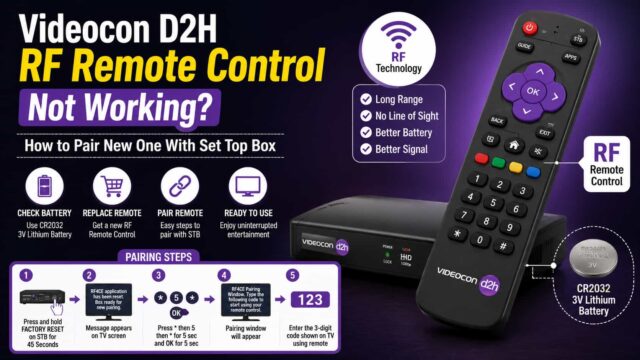
If your RF remote is not responding properly, replace the batteries, verify that it is paired with the set-top box, and ensure there are no obstacles interfering with communication.
This guide explains how to retrieve the Videocon D2H Satellite Management Password, use it to access installation settings, and monitor signal strength for optimal satellite TV reception.




Signal .no AAA rahs